Gus · your AI chief of staff · private beta

Meet Gus. Your universe, handled.

Gus is the chief of staff for your life. He runs a crew of specialist agents who read your world, brief you every morning, and act only when you approve.

A day with Gus

Your day, handled.

Real screens from the Gus demo workspace, with made-up data. Scroll through a day; tap a numbered dot for what it does, or a screen to zoom in.

07:00Morning
  1. The briefOvernight your crew read everything. Coffee, then what needs you.
  2. Ask, or hand over a jobOne box for questions and jobs; Gus picks the agent and the model.
  3. The crew gets to workEach agent has a job, a queue and things it is waiting on you for.
  4. Review, then approveA live check of what got done, what's next and what it cost.
  5. OvernightScheduled work runs on its own. Nothing is sent, applied or paid without you.
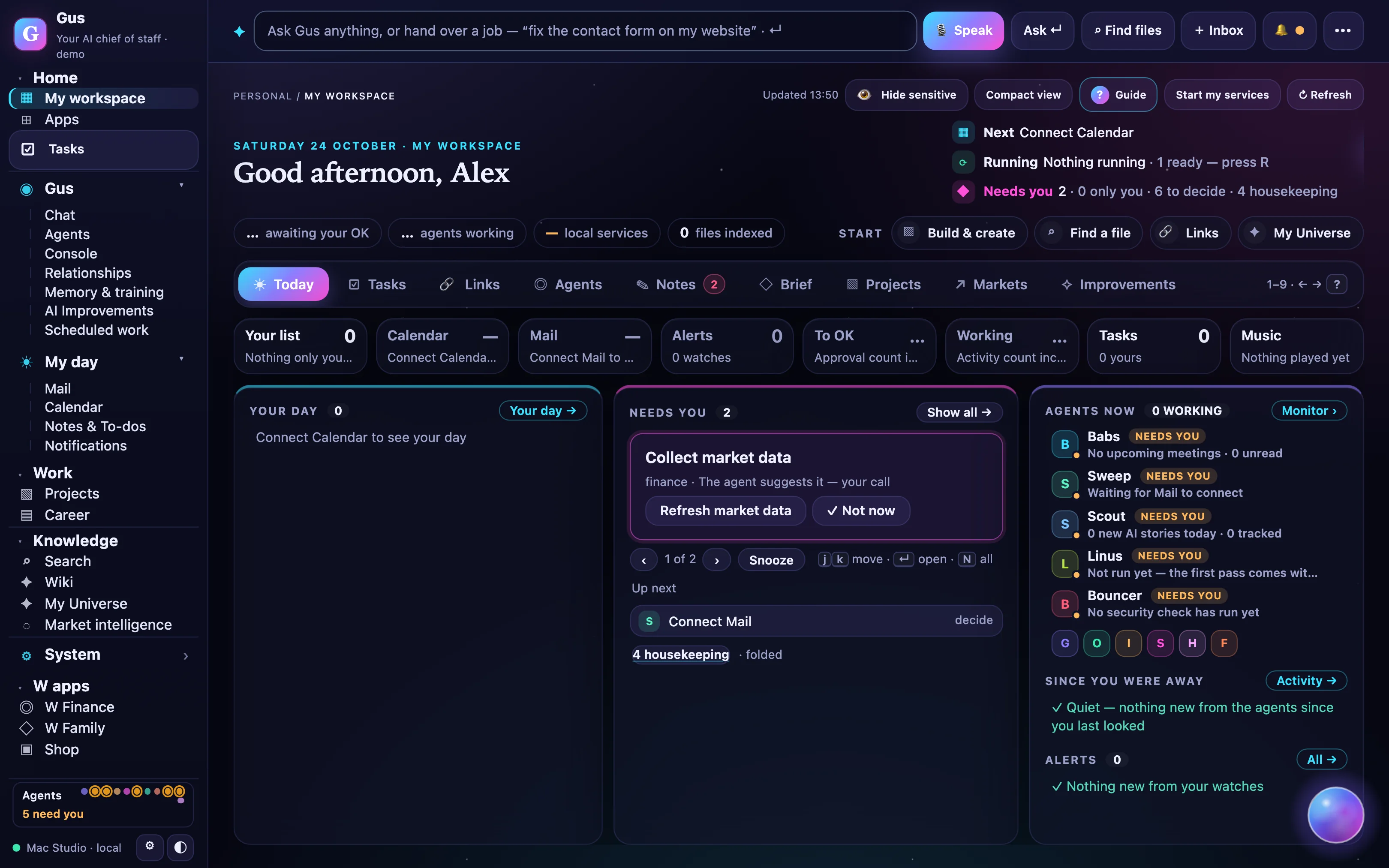
My workspace · Today
The Gus home screen: today's tiles for your list, calendar, mail, alerts, runs needing approval, agents working, tasks and music

07:00 · Today. Your day, what needs you, and the agents at work, on one screen. Eight tiles above: your list, calendar, mail, alerts, approvals, agents, tasks and music.
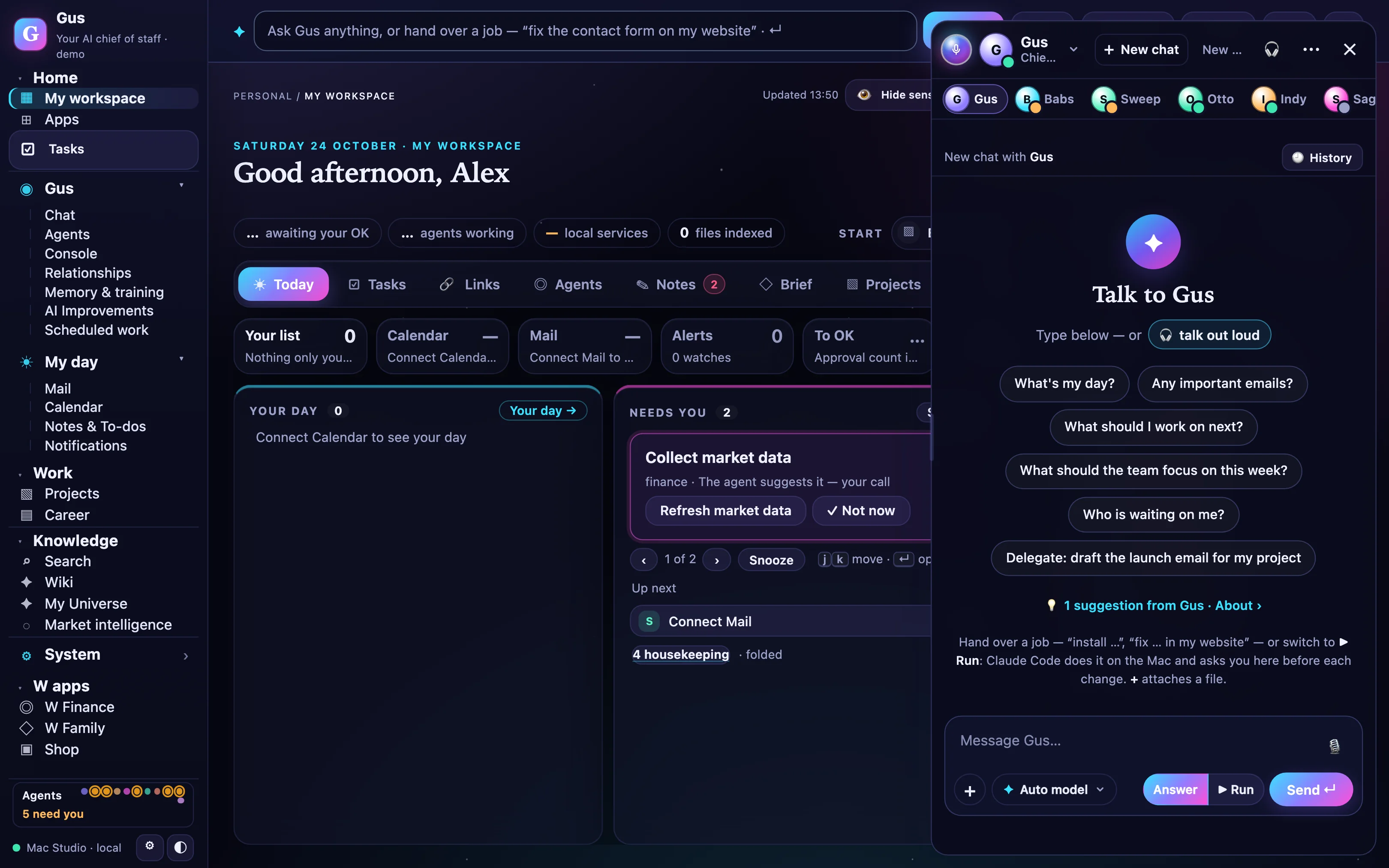
Talk to Gus
The Gus panel: suggested questions, agent tabs and a message box with Answer or Run

08:30 · Ask. “Draft the launch email for my project.” Gus answers from your own data first, and picks a model only when it's needed.
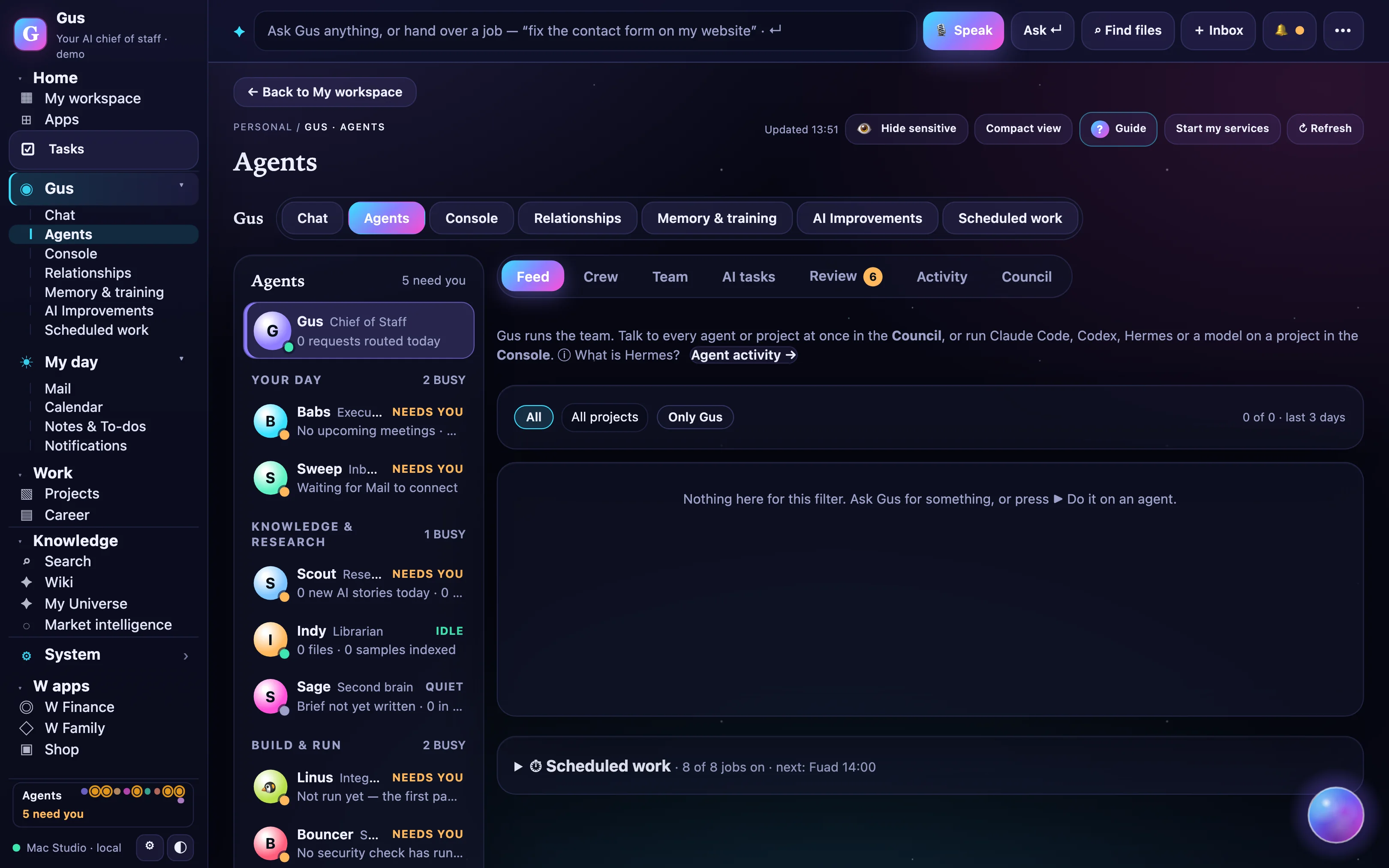
Agents · The deck
The Agents deck: the roster grouped by Your day, Knowledge and Build, each agent with its status and what it needs you for, and the feed of what the crew did

10:30 · The crew. The deck: every agent with what it's doing now and what it's waiting on you for, and the feed of everything the crew did.
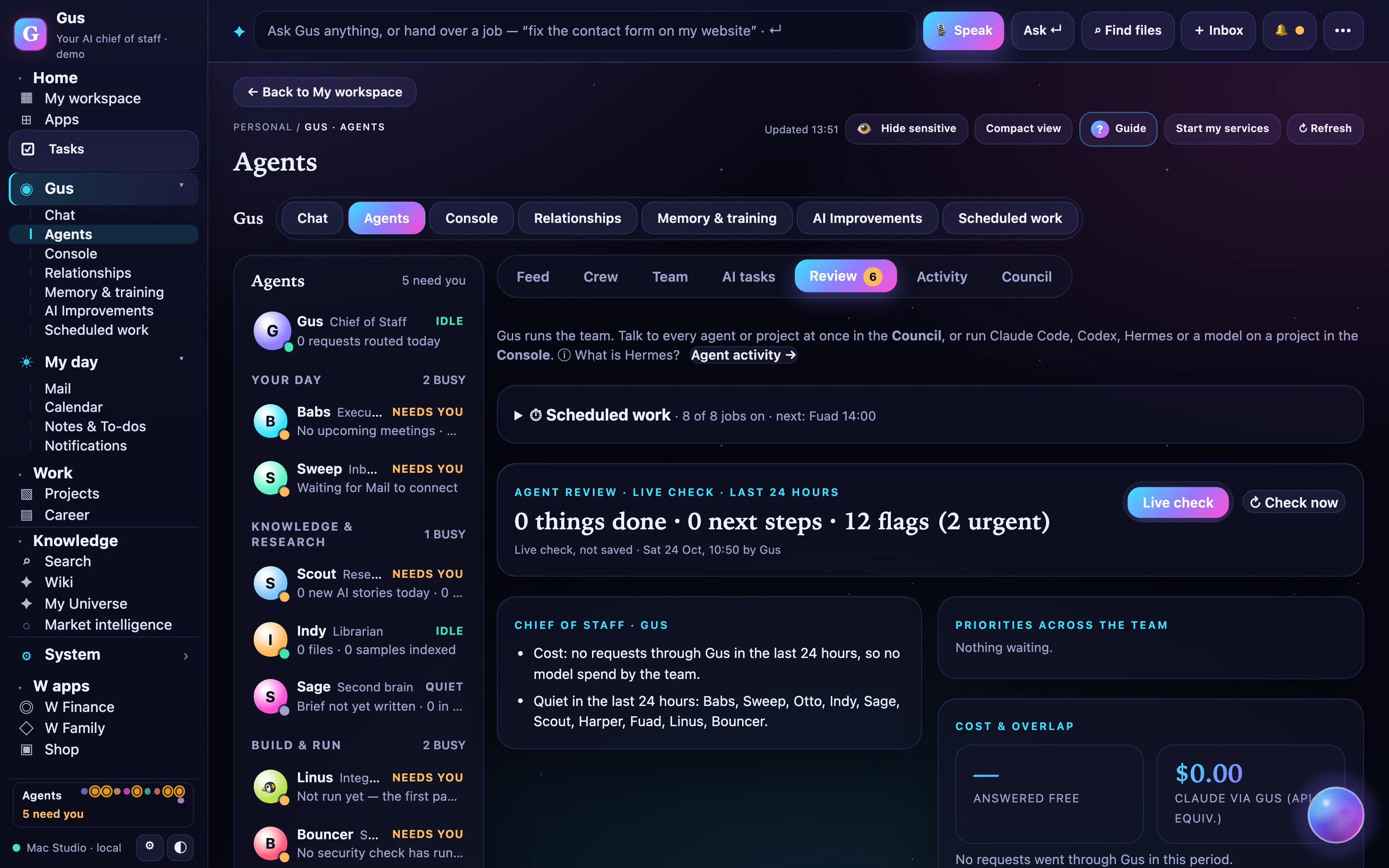
Agents · Review
The Review page: things done, next steps and flags in the last 24 hours, priorities across the team, and cost

13:00 · Review. One page shows what got done, what's next, the flags and what it cost. Anything outside Gus waits for Approve.
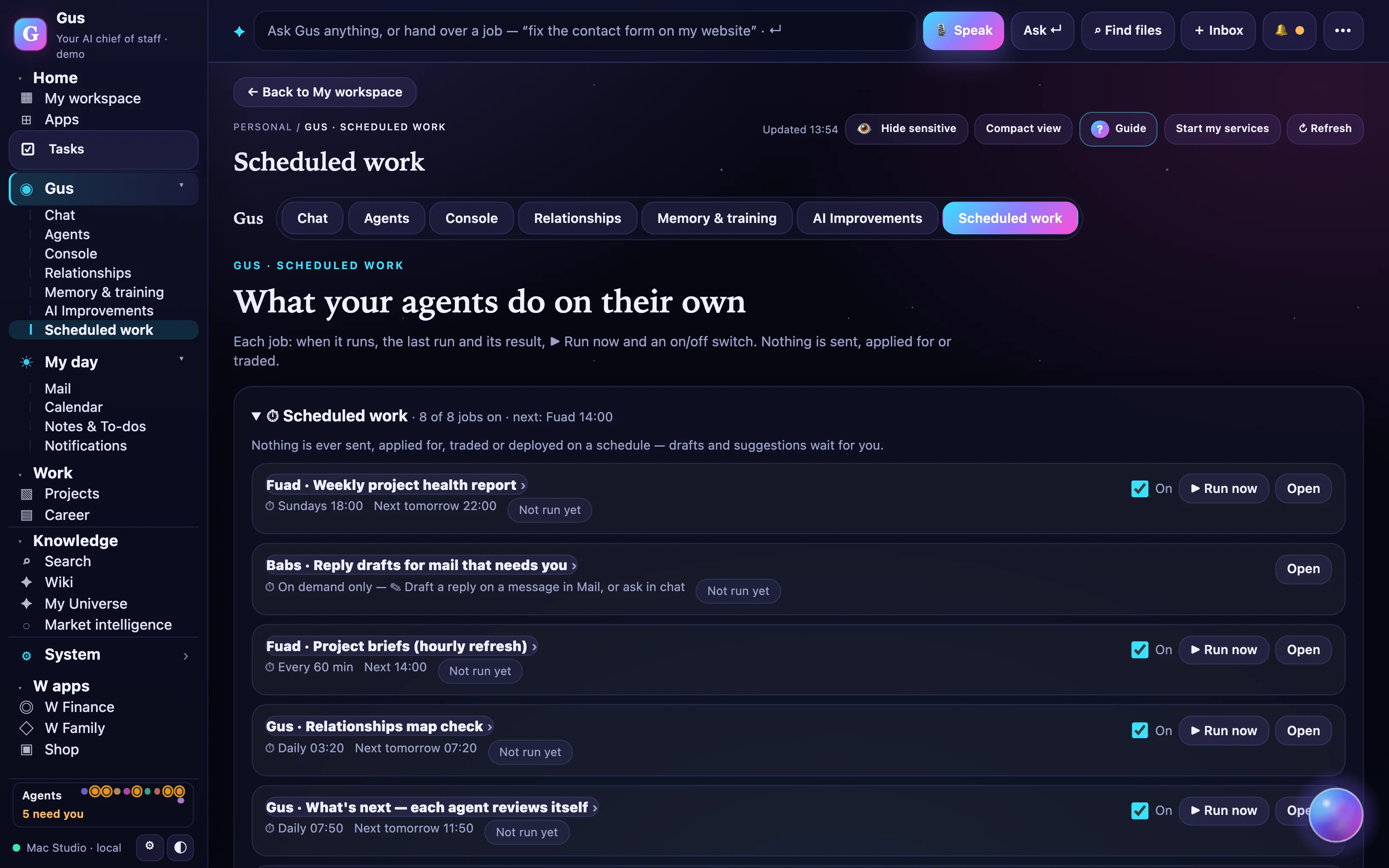
Gus · Scheduled work
Scheduled work: what agents do on their own, each job with its time, an on switch and Run now

22:00 · Overnight. Drafts, reports and reviews run on their own schedule. In the morning they're waiting in your brief.

Inside the OS

Everything you know, connected.

My Universe maps your projects, people, notes and agents. Relationships shows who hands work to whom, and why. Tasks keep every open item with an owner.
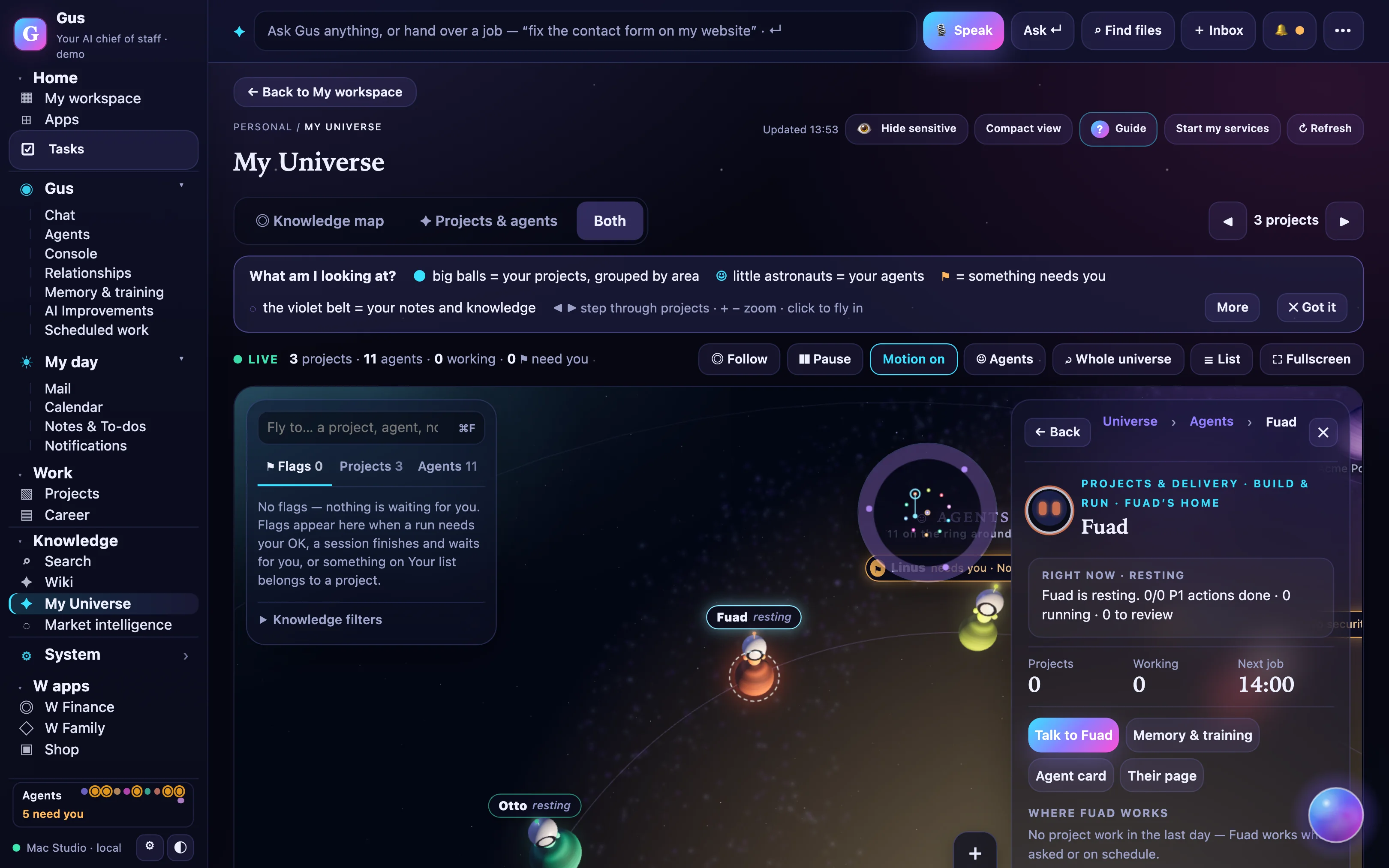
My Universe
My Universe: the agents orbiting Gus, with Forge selected
Meet the crew

Thirteen agents, each with a real job.

Gus is the chief of staff; the rest are specialists he controls. Pick one to see what it does, the jobs it takes on, and its page in the demo workspace.

Talk to Bouncer

Ask a question. Get an answer, and a card for anything that changes something.

A scripted exchange. Bouncer checks your connections and sign-ins, explains what it found, and puts the change in front of you as an approval card.

  • Answers from your own data first; uses a model only when it must
  • Never sends, pays, deletes or publishes without your click
  • Every approval lands in your audit log
BouncerSecurity · scripted demo
How the crew works

You talk to Gus. Gus runs the crew.

The crew are the specialists he controls. Each has a name, one job and one set of sources. Gus routes the request, the specialist does the work, Gus brings it back with an Approve card if anything leaves the house.
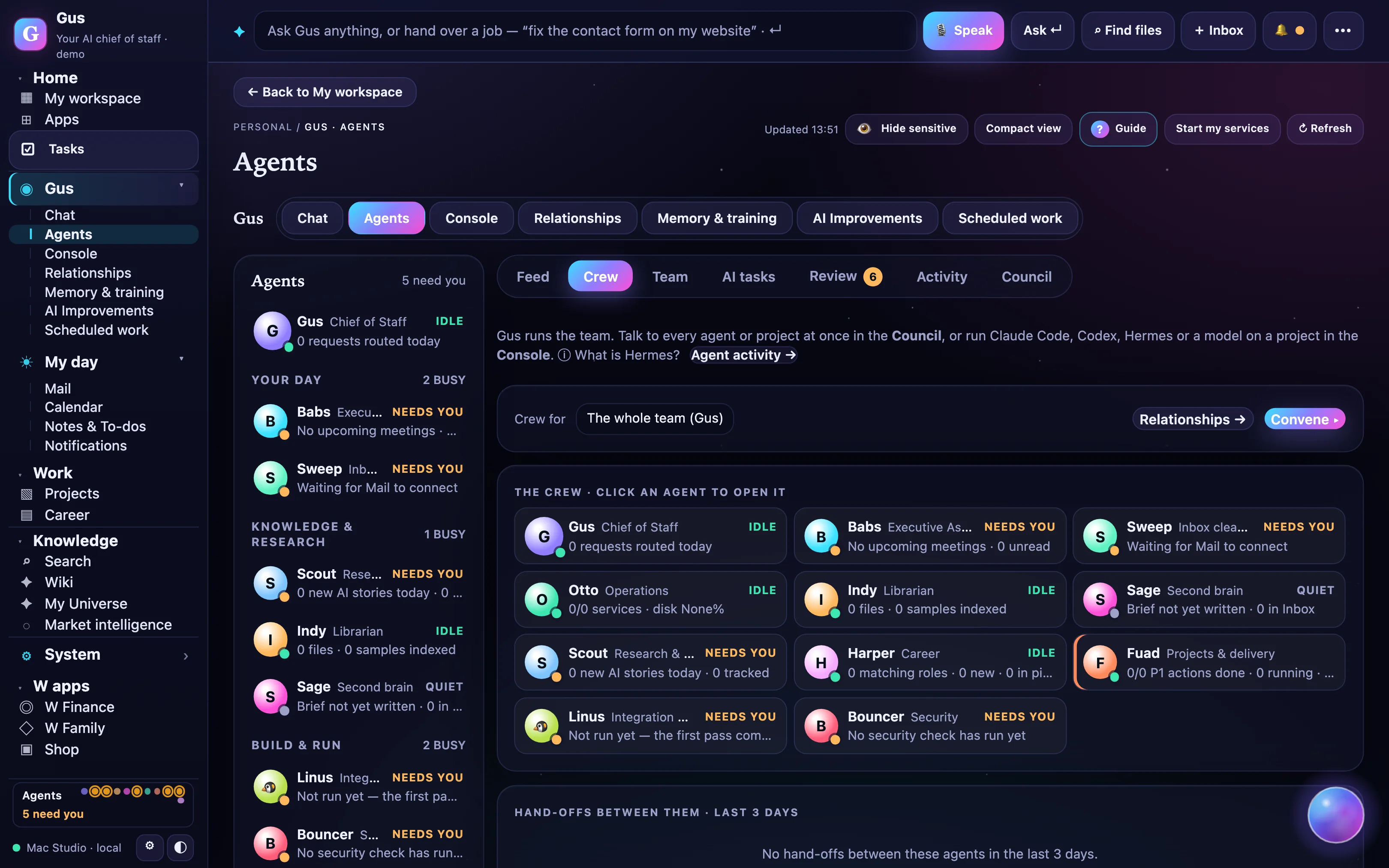
The crew
The Crew view of the Agents deck: Gus at the top, the specialists grouped under him
▦

Console

Panes for every agent at work: what it is doing, what it has queued and what it is waiting on you for. Open any run and read along.

◉

Monitor

Live tiles across the crew: runs, approvals pending, spend against your cap, and anything that failed, so nothing quietly breaks.

☰

The deck

The roster, the feed of everything the crew did, and each agent’s own page: its memory, its training box and the rules you taught it.

How it works

Agents do the work. You keep the keys.

◎

Agents, routed

  1. You ask, or a schedule fires. One box on every page, or a job on a timer.
  2. Gus picks the agent and the model. Fast and cheap for triage, a workhorse for most work, deep reasoning only if you opt in.
  3. Answers come from your data first. Each reply shows who answered, which model and what it cost.
  4. Agents hand work to each other. Every hand-off is a visible line in Relationships.
✓

Approvals, always

  1. Outside-world actions are cards. Send, delete, pay, publish or change a permission: Approve, Deny, Undo.
  2. You set the strictness. Strict, middle or standard, for what happens inside Gus. No bypass mode.
  3. Spend caps on by default. Anything over 50 credits asks first; video always asks.
  4. Everything is logged. Your audit log shows what each agent did and when.
⌂

Local-first

  1. The Gus Bridge lives on your Mac. Signed, notarised, outbound only; nothing connects in.
  2. Only the folders you pick. Apple Notes two-way, Reminders read-only, local models for private work.
  3. Writes ask on your Mac too. Paths are confined; actions are allow-listed.
  4. We never train on your data. Hosted models get the minimum context a job needs.

Try it: choose how strict.

Outside-world actions ask at every level. The levels change what happens inside Gus.

2,000 credits
ActionWhoNeeds you?

Security and data separation in detail →

Live demo

Watch the crew work. Approve what matters.

Agents pick up jobs, the feed writes itself, and anything that leaves Gus lands in “Needs you”. Try approving one.

One front door

One account. Your money, your family, your shop.

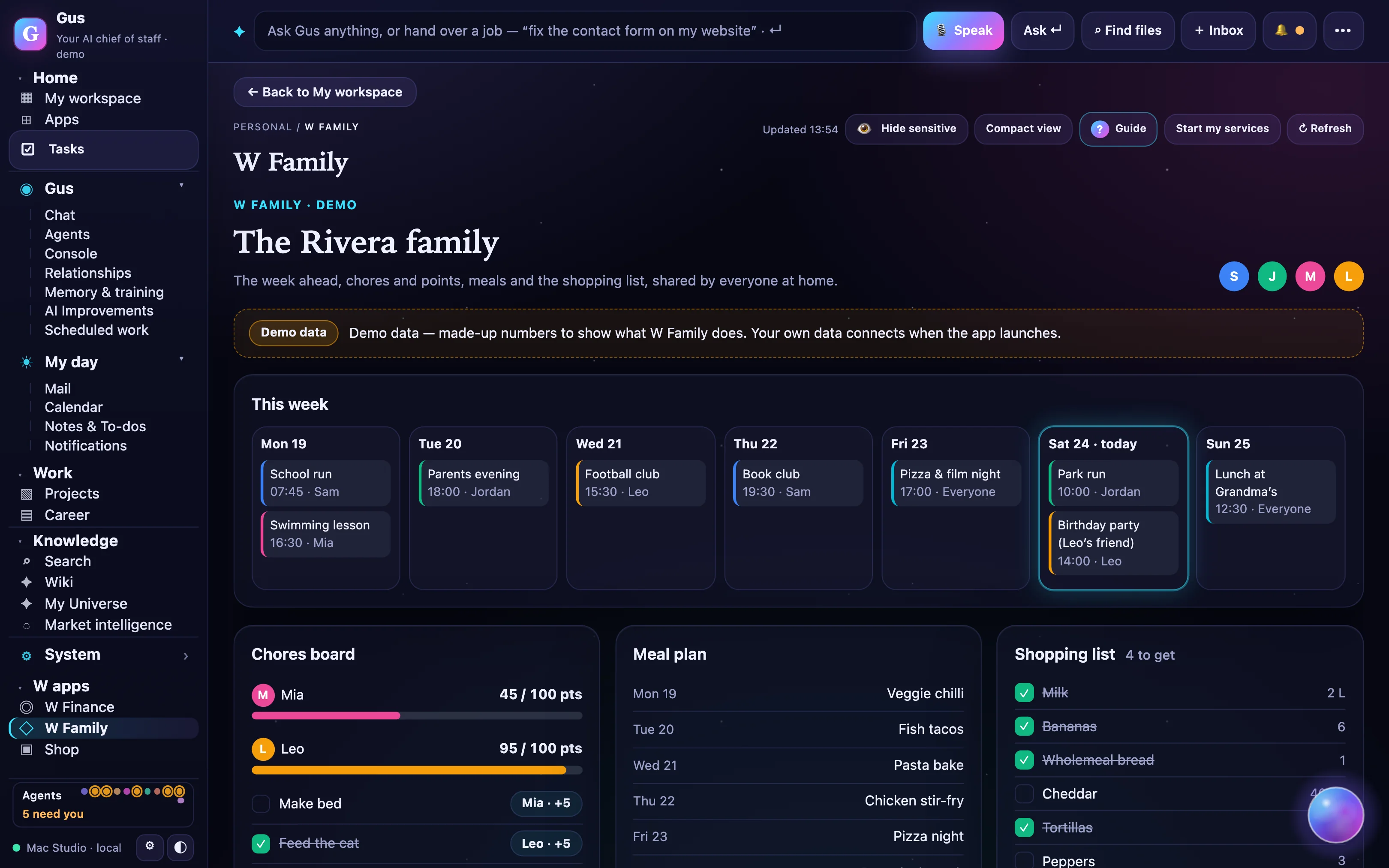
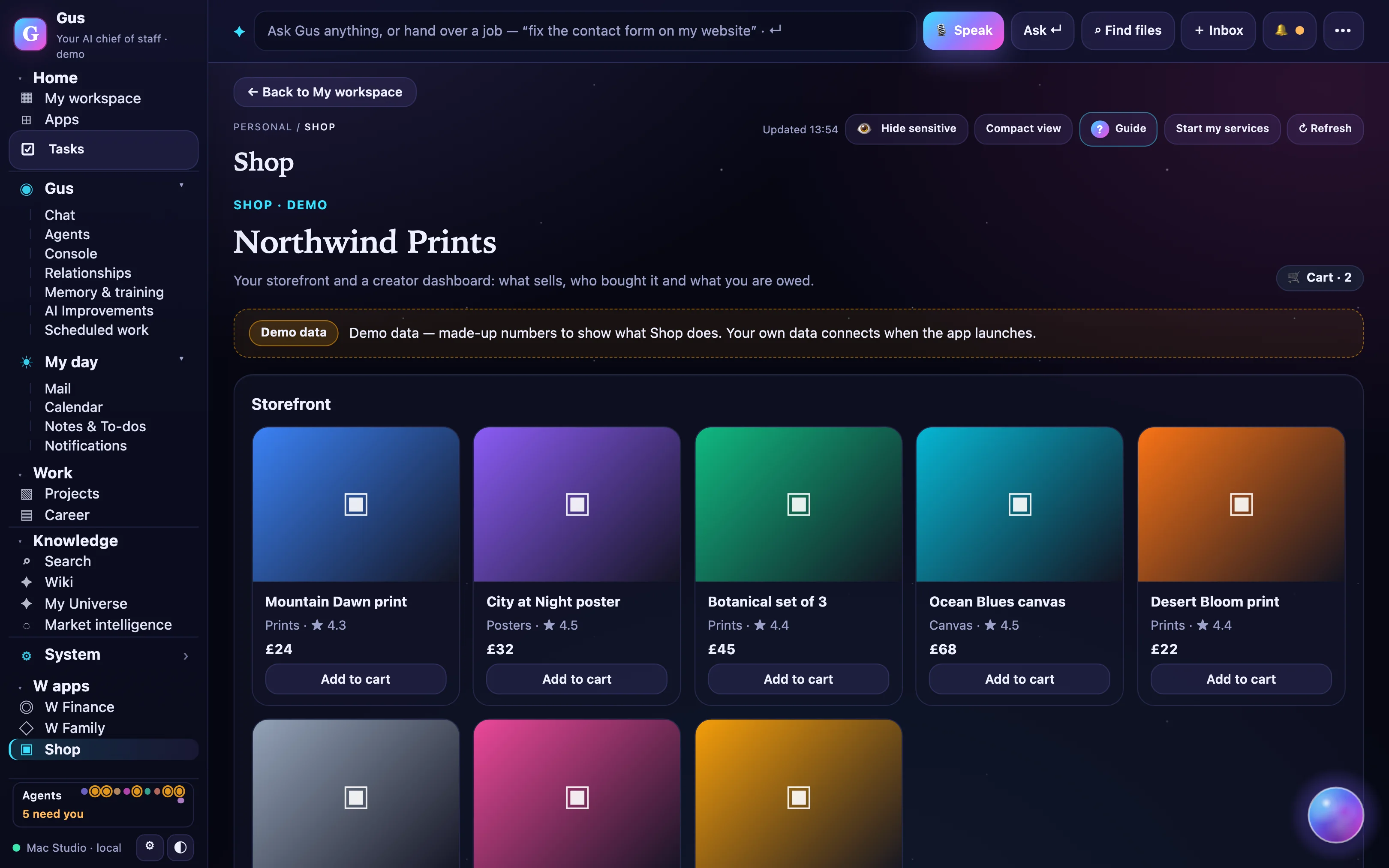
The apps open from inside Gus with one sign-in, and their cards appear in your brief: “statement due Thursday”, “3 family events today”, “2 new orders”. Real screens from the demo workspace.
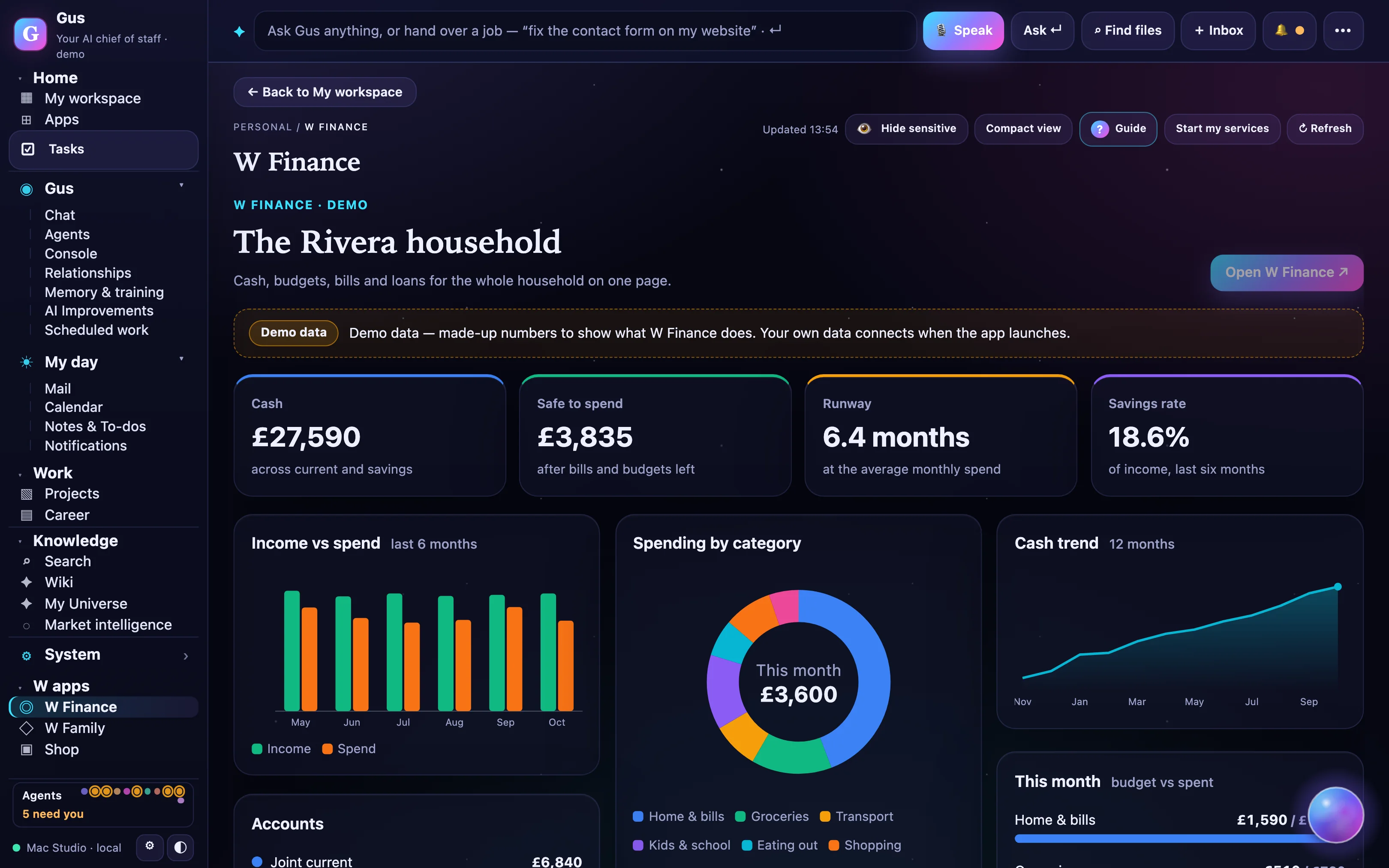
Bundle Gus Pro, Finance Plus and Family Plus as Gus One for $29 a month. Compare bundles

Coming soon

What’s next on the train.

The bigger pieces on the way. Ask for what you want on the roadmap.

Coming soon

Gus Home

Bills, subscriptions, warranties, maintenance and smart-home routines; cancels what you forgot.

"Forgot about it" is the top churn reason in subscription apps; reuses Sweep's unsubscribe pattern and Finance's bills watch.

Coming soon

Gus Health

Appointments, medication reminders, screenings due, family health records, kept local via the Bridge.

High-trust, high-retention data nobody in the market touches; the strongest local-first story. Observations, not medical advice.

Coming soon

Gus Travel

Trips in the family calendar, bookings as approval cards, documents in the vault, What's On abroad.

Family already has a worldwide What's On feed and a referral seam; travel affiliate rates are the best in the plan.

Coming soon

Gus Learn

A homework helper that explains rather than answers, reading streaks, a tutor the parent can see.

Parents are the heaviest AI users; story apps and tutors are $4 to $10 each with no family organiser. Half-built in Family Studio.

Coming soon

Gus Creator Studio

Scripts, thumbnails, clips, show notes and a posting calendar for video and audio creators.

Extends Shop Studio's AI production beyond authors; Stan at $29 to $99 shows the price point.

Coming soon

Gus Business

A shared crew for a small practice: shared briefs, approvals per seat, client workspaces, white-label.

Viktor reached $15M ARR in three months on the AI-employee story at $50 to $100; Gus adds approvals and a chief of staff.

Coming soon

Gus Car

Service, insurance and renewal dates, fines and tolls, fuel and charging into Finance.

Small, cheap and sticky in the GCC where renewals are paperwork-heavy.

Every week, something new

New features every week. Tell us what you want.

A public release ships every Tuesday across every app, with a changelog and a “you asked, we built” list. Anyone can request a feature; members vote.

12releases in a row
21features shipped
7built from requests
Placeholder
“The morning brief replaced three apps and a to-do list. I approve five things over coffee and I'm done.”
ABeta tester · product manager
Placeholder
“I finally trust an assistant with my inbox, because nothing goes out without my tap.”
BBeta tester · founder
Placeholder
“I asked for a feature on a Monday. It shipped the next Tuesday with my name on it.”
CBeta tester · parent of three
Pricing

Start free. Your key, or our credits.

Free
Trying Gus
$0forever
  • 100 credits
  • 3 agents
  • 2 connectors
  • Morning brief
  • 1 GB
Join free
Starter
Power users with their own AI keys
$9/ month
  • Bring your own key, no markup
  • 300 house credits
  • Full crew
  • 6 connectors
  • Desktop bridge
  • 10 GB
Join the beta
Most people
Pro
Most individuals
$20/ month
  • 2,000 credits
  • Full crew
  • Unlimited standard connectors
  • All briefs
  • Nightly self-improvement
  • Desktop bridge
  • 50 GB
14-day trial, no card
Save 27%
Gus Household
Two adults and the whole family
$49/ month
  • 2 Pro-level adults
  • Family Premium
  • Finance Pro
  • 5,000 pooled credits
  • A shared household Gus

Separately $67 a month.

Join the beta
Founder offers · public beta only

Founder Pro $179 a year, locked while you stay (first 500). Founder Lifetime $249 once for Starter features for life (first 250).

All pricing →
Questions

Good questions.

Or ask Gus: the chat bubble in the corner of every page.

Why not just ChatGPT or Claude at $20?
Gus Pro is also $20, and he is connected to your real mail, calendar, files, money and family. A chat assistant forgets you between sessions; Gus briefs you every morning about your day. Already paying for a model? Bring the key: Starter is $9 and text costs nothing extra.
I don't trust an agent to send or spend.
Neither do we. Nothing leaves the house without an Approve card, and you can undo. Spend caps are on by default.
Credits always cost more than the page says.
Every action is quoted before it runs. Failed or retried runs are never charged. Your cap is a hard stop. Or bring your own key.
My data goes to the cloud.
Not the sensitive parts, unless you say so. Gus Bridge keeps files, notes and local models on your Mac. Children's data never reaches a hosted model.
Another subscription.
Gus replaces several. Household at $49 covers two adults, the children's product and the finance product; the parts cost about $67.
Is Gus Finance financial advice?
No. Every insight is an observation about your own numbers, labelled as such.
You're one person. Will this exist next year?
The weekly release streak is public, with a reason posted if we miss. Founder prices are locked for life. You can export everything, any time.
Is Gus a chatbot?
It is a team, not a chat window. Gus is the chief of staff: he routes work to specialist agents, keeps tasks, briefs and projects, and connects to your accounts. Chat is one way in.
Is my data safe?
Your data is encrypted, separated per account, and never used to train AI models. Sensitive files can stay on your own Mac through the Gus Bridge. Read the security overview.
Does it send email on its own?
No. Anything that sends, deletes, spends or changes something outside Gus arrives as a card with Approve, Deny and Undo. There is no bypass mode.
Which accounts can it connect to?
Outlook and Google Calendar at launch, Gmail in a limited beta while Google's security assessment completes, plus files, notes, Notion, GitHub and more.
Can I use my own AI key?
Yes. On Starter, plug in your own Anthropic, OpenAI or OpenRouter key: text actions cost 0 credits and we add no markup.
Are the screens on this page real?
Yes: they're captured from the Gus demo workspace, which runs the real product over made-up data. No real person's data is shown.
Can I cancel at any time?
Yes. Monthly plans run to the end of the paid period; annual plans have a 14-day refund window. Export or delete your data whenever you like.